
Request reading
Reads a pasted list of absences into individual requests by date, building, and position, and holds anything ambiguous for a person.
Know what you are paying for.
FSG Go is our automated platform for scheduling, time, and invoicing. It takes substitute requests by building, sends each approver the week in one email, and attaches the approval record to every invoice.
Paper timesheets and emailed spreadsheets leave a business office guessing. Who signed off? Was that a half day? Which building?
FSG Go puts every day in front of the person at your school who knows, records their name against it, and attaches that record to the invoice.
9 timesheets to approve for the week of Nov 9 - Demo Charter School
Focused Staffing Group to me
9 timesheets to approve
Hi Priya,
9 timesheets (58.5 hours) for the week of Nov 9 at Demo Charter School are ready for your approval.
Open them with the button, tick the ones that are right and approve; send any that are wrong back with a note and we'll fix them.
This link works until Thu, Nov 19, 1:00 PM EST; you can open it as many times as you need.
Automation runs the hand-offs where time and billing usually go wrong.
Reads a pasted list of absences into individual requests by date, building, and position, and holds anything ambiguous for a person.
Fills each professional's week from the schedule and texts it to them on Friday to confirm or correct.
Sends the approval email Monday at 1 PM and a reminder Wednesday. Nobody at your school has to remember to ask.
Stamps every approval with a name and a time and compiles the record that travels with the invoice.
Four steps. Your approver is in one of them.
Each professional gets a text with their week, filled in from the schedule. They confirm it or correct it.
At 1 PM each approver receives one email with their own link. There is no password, and it works on a phone.
They tick the days that are right and approve with their name. Anything wrong goes back with a note and we fix it.
The invoice is itemized, and a Timesheet approvals PDF goes with it: every day, who approved it, and when.
The link opens that week's timesheets for your school: each day with the person, building, role, times, and who they covered for. Tick the days that are right, then choose Approve.
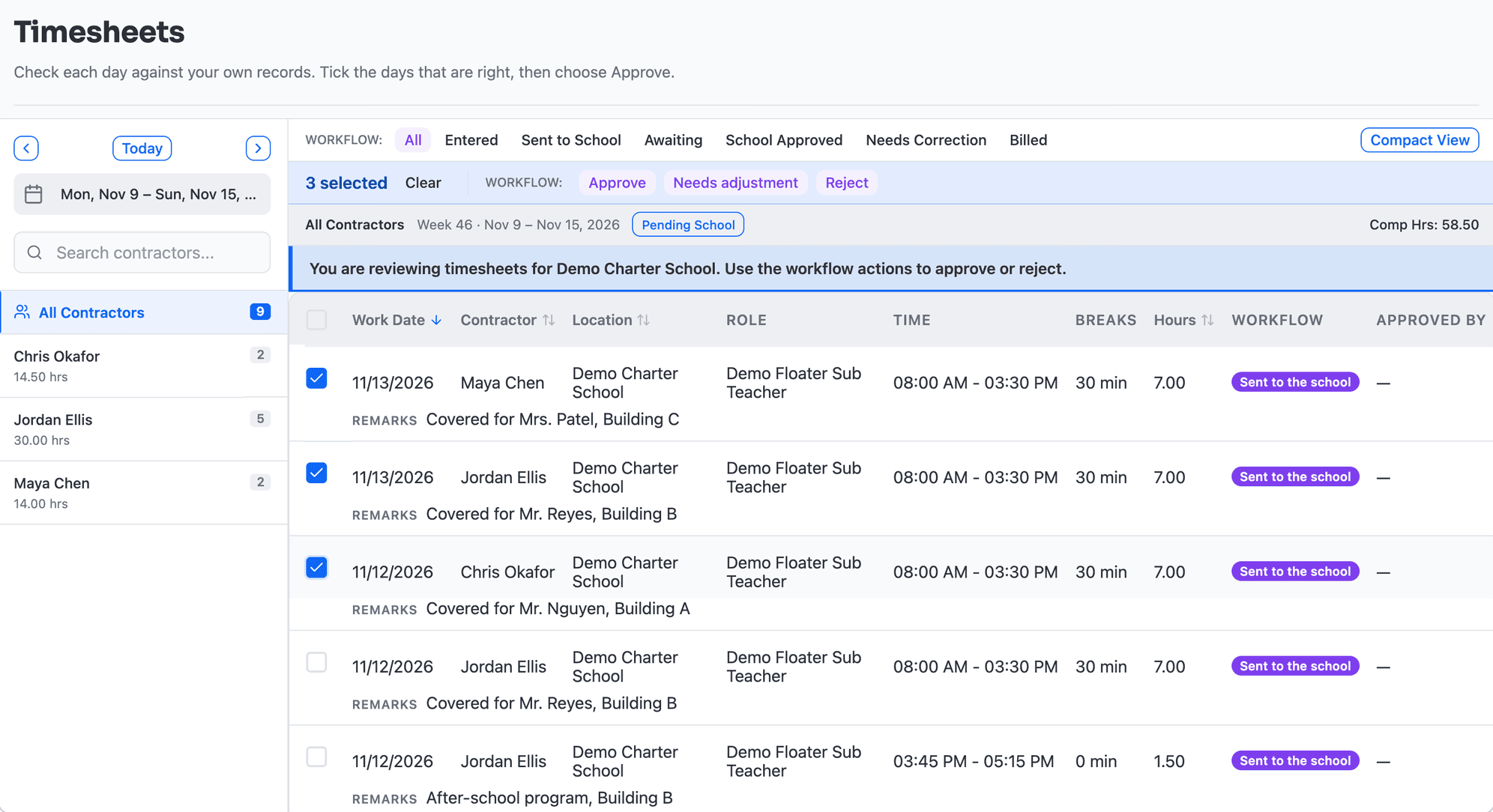
Each person at your school sees only the part that is theirs.
Takes requests by building, position, full or half day, room, and who is being covered: single, repeating, or pasted as a batch. Fills are emailed and texted to your school contacts.
Delivers timesheets Monday at 1 PM with a reminder Wednesday. The link works until Thursday at 1 PM and opens as many times as needed.
Records Approve, Needs adjustment, or Reject. Approving takes a typed name; the other two take a note that comes straight back to us.
Attaches a Timesheet approvals PDF to each invoice, listing every day, who approved it, and when.
Itemizes each invoice with sections and subtotals. Where your district needs it: vendor number, fund and account codes, a row per person or per day, and a timesheet backup page.
Keeps separate contacts for approving time, requesting staff, and billing, so each message reaches the person who handles it. Messages keeps one thread with our scheduling team.
Alex Morgan
Paraprofessional · Demo Charter School
All 5 days approved by Demo Charter School
Hours worked: 35.00
This is the record that goes with an invoice. Beside each day: “Approved by Priya Shah through the review link emailed to Demo Charter School, 11/16/2026 2:14 PM.”
With FocusedEDU, each approver gets one email on Monday with their own link. They tick the days that are right and approve with their name. The invoice then arrives with a Timesheet approvals PDF showing every day, who approved it, and when.
No. Each approver gets an email with their own link. It opens on a phone or a computer with no password.
Choose Needs adjustment or Reject and add a note. It comes back to our team, we correct it, and it returns for approval.
Online, by building, position, full or half day, room, and who is being covered. Requests can repeat or be pasted in as a batch. You see who is coming, and fills are emailed and texted to your school contacts.
Yes. Invoice layouts are set per district: vendor number, fund and account codes, a row per person or per day, and a timesheet backup page.
Find · AI-enabled recruiting
AI-enabled recruiting platform that turns every request into a tracked opening with one named recruiter, a daily risk review, and AI-prepared next steps.
Explore FSG MatchClear · AI-powered credentialing
AI-powered credentialing platform that reads every clearance and certificate on upload, flags exceptions, and tracks each expiration date before a candidate is presented.
Explore VerifAIBring a role you need filled. We will show you how it moves through the platform, from the request to the invoice.